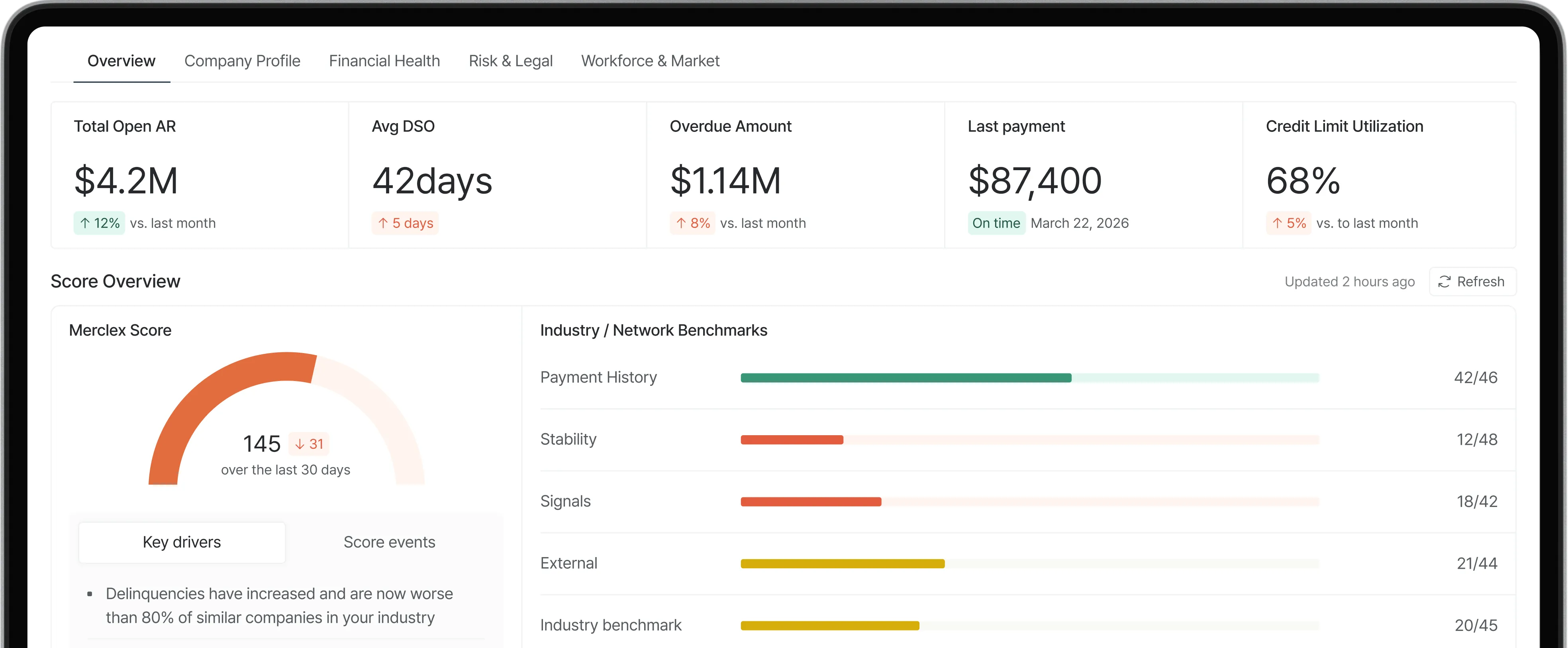
• Accounts receivable automation is software that handles the invoice-to-cash cycle without manual intervention: generating and sending invoices, triggering payment reminder sequences, matching incoming payments to open invoices, and escalating accounts that do not respond.
• The core benefit is not just speed. It is consistency. An automated system sends every reminder on time, to every customer, every cycle, without anyone remembering to do it.
• For B2B businesses extending net terms, the most important additional layer is credit intelligence: checking customers before you extend credit, monitoring them after, and flagging the ones showing early signs of trouble.
• Most accounting tools like QuickBooks and Xero handle invoicing but stop well short of full AR automation. Dedicated AR platforms cover the rest.
Direct Answer
Accounts receivable automation is software that manages the process of collecting payment after a sale, from invoice creation through cash application, without requiring manual action at each step. When a sale closes, the software generates and sends an invoice. As the due date approaches, it triggers pre-set reminder sequences. When payment arrives, it matches the amount to the correct invoice and updates the ledger. If a customer does not respond, it escalates the account through dispute management or collection queues.
The automation sits on top of your accounting system, usually syncing with QuickBooks, Xero, NetSuite, or SAP. It does not replace those systems. It fills in the gaps they leave.
The Four Stages AR Automation Covers
1. Invoice and delivery
The process starts when a sale is completed. AR automation generates the invoice, matches it to the purchase order if applicable, and sends it to the customer through their preferred channel (email, portal, or EDI). It logs the transaction against the customer account and starts the clock on payment terms. For businesses with high invoice volumes, this alone removes significant manual work.
2. Dunning and reminders
This is where most manual AR work lives, and where automation delivers the most immediate time savings. A dunning sequence is a set of timed, pre-written reminders sent before and after the due date. The first might be a courteous heads-up three days before the invoice is due. The second goes out on the due date if unpaid. A third goes a week later. A fourth a few weeks after that, in a firmer tone.
Good AR automation adapts the tone and timing of reminders based on the customer's payment history. A reliably prompt payer gets a lighter touch. A chronic late payer gets a stricter sequence earlier. The system handles this without anyone having to think about it.
3. Cash application
When payment arrives, it needs to be matched to the correct open invoice or invoices. In companies with high invoice volumes, this process is tedious and error-prone when done manually. Payments arrive by bank transfer, check, card, or ACH, often without clear reference numbers, sometimes covering multiple invoices or partial amounts.
AR automation uses AI-powered matching to reconcile incoming payments against open invoices, flag deductions and short payments for review, and update the ledger automatically. The finance team only needs to handle the exceptions.
4. Escalation and reporting
Accounts that do not respond to reminder sequences move into escalation workflows: dispute tracking, hold flags, collection queues, or direct handoff to a collection agency network. Good AR software handles this with a single click, packaging the customer record, invoice history, and relevant documents for the agency.
Throughout the cycle, the software maintains live AR aging reports and DSO (days sales outstanding) tracking, so the finance team has a real-time picture of what is outstanding and how it is trending.
What AR Automation Does Not Cover (But Should)
Most AR automation platforms focus on what happens after an invoice is sent. That is useful, but it is only half the problem for B2B businesses extending net terms.
The other half is upstream: who gets credit in the first place, and whether they are still creditworthy after you have extended it. A modern platform should also handle:
• Credit onboarding: digital credit applications with automated fraud checks (EIN verification, OFAC/sanctions screening, domain age, address matching) and financial data room summaries before terms are set.
• Continuous credit monitoring: AI-driven tracking of customer health signals, including earnings calls, LinkedIn headcount changes, news sentiment, and leadership departures, to surface deteriorating accounts before they miss a payment.
• Behavioral reputation scoring: tracking each customer's payment patterns over time and using that to calibrate both reminder tone and credit limit decisions.
Merclex covers all three layers alongside the standard AR automation workflow. See merclex.com for how the platform connects onboarding, monitoring, and collections.
AR Automation vs. Accounting Software
QuickBooks and Xero handle invoicing and basic payment reminders, which is enough for businesses with a small number of reliable customers who pay upfront or on receipt. When you start extending net terms to multiple customers, the gaps become problems:
• QuickBooks and Xero send a single reminder. They do not support multi-step dunning sequences that adapt based on payment history.
• Neither platform offers credit application tools, fraud checks, or customer onboarding workflows.
• Neither monitors customers after credit is extended. There is no alert if a customer starts showing financial stress between invoice dates.
• Neither supports dispute tracking, collection agency forwarding, or behavioral reputation scores.
AR automation software connects to QuickBooks and Xero rather than replacing them. It handles what they do not.
Who Needs AR Automation
The honest answer is: any B2B business that extends net terms to more customers than can be managed with a spreadsheet and memory. That threshold is roughly 20 active credit accounts for most finance teams. Beyond that, things start to slip.
The business case sharpens when:
• DSO is exceeding payment terms by more than 10 days consistently.
• The same accounts are late every cycle and nobody is following up systematically.
• A customer has gone significantly overdue without any early warning signs being caught.
• Credit decisions are being made on gut feel rather than verified financial data.
• The person managing AR is spending more than a few hours per week on manual follow-ups.
Frequently Asked Questions
What is the difference between AR automation and billing software?
Billing software generates and sends invoices. AR automation handles everything after: reminder sequences, cash application, dispute management, and escalation. Many platforms do both, but the automation piece is what drives the reduction in DSO and manual workload.
How long does it take to set up AR automation?
Simple tools with QuickBooks or Xero connectors can be live in a day or two. Mid-market platforms with ERP integrations typically require a few weeks for configuration and testing. Enterprise platforms can take months. The more complex your customer base and ERP environment, the longer the setup.
Does AR automation replace the AR team?
No. It removes the manual and repetitive work: sending reminders, matching payments, preparing escalation packets. The team handles exceptions, relationship decisions, and anything requiring judgment. The output is that the same team can manage a larger portfolio without the work increasing proportionally.
What data does AR automation need to get started?
At minimum: your customer list, open invoices, and payment terms. A connection to your accounting system or ERP handles most of this automatically. Platforms with credit monitoring capabilities also pull in external data, such as trade credit scores, news feeds, and LinkedIn signals, once customers are onboarded.
What is DSO and why does AR automation reduce it?
DSO stands for days sales outstanding, the average number of days between sending an invoice and receiving payment. AR automation reduces DSO primarily by making the reminder process consistent: every invoice gets followed up on time, every cycle, without anything slipping. Companies that implement AR automation typically report DSO reductions of 10 to 30 days, depending on how manual and inconsistent the prior process was.