• Small businesses that extend net terms to more than 20 active credit customers, or whose DSO consistently exceeds their payment terms, typically see a positive return from AR automation within the first month.
• The strongest signal is not invoice volume. It is whether the same customers are late every cycle and nobody is following up systematically.
• AR automation for small businesses does not have to be expensive. Free tiers exist, and entry-level paid plans start at $49 per month. The comparison is not software cost vs zero: it is software cost vs the time and write-offs of doing it manually.
• The upstream problem most small businesses overlook is credit onboarding. Extending net terms to customers without a credit check or fraud screen is the most common root cause of write-offs that were entirely preventable.
Direct Answer
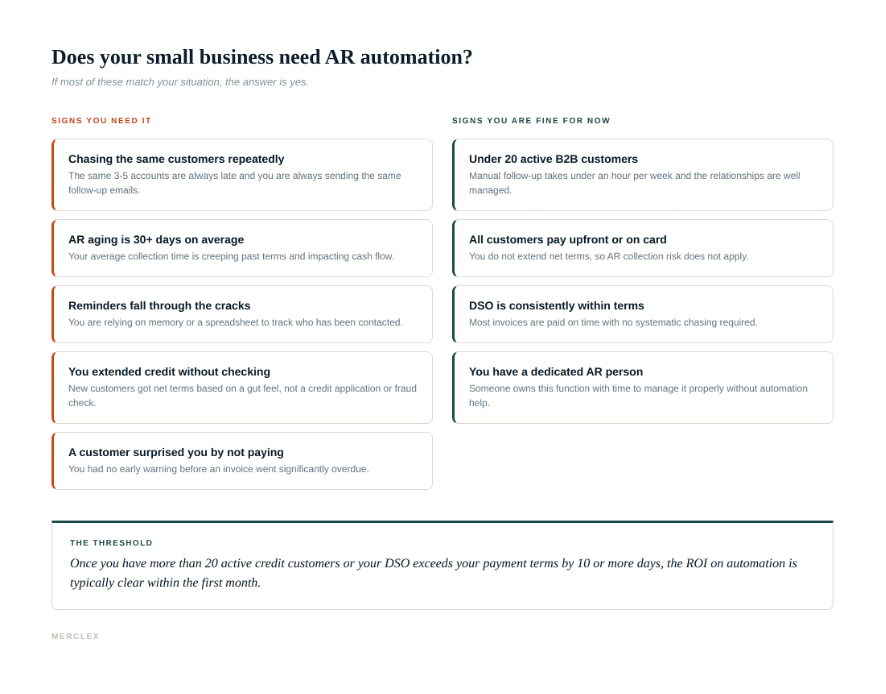
Small businesses need AR automation when the manual process is breaking down: invoices going uncollected, reminders falling through the cracks, or the same late accounts consuming hours of follow-up every month. That point comes earlier than most finance teams expect, typically around 20 or more active credit customers, or when DSO starts creeping 10 or more days past payment terms.
Before that threshold, a combination of QuickBooks or Xero with a disciplined manual process is often sufficient. The honest filter is whether your current approach means every invoice gets followed up consistently and nothing slips. If it does, you may not need additional software yet. If it does not, the cost of a tool is almost certainly lower than the cost of the delays and write-offs you are absorbing.
The Checklist: Signs You Need It vs. Signs You Are Fine
Map your situation against both columns before deciding.
The Case For
Consistency, not speed
The main benefit of AR automation is not that it is faster than a human. It is that it never forgets. Every invoice gets a reminder sequence. Every late account gets escalated at the right time. The same customer who has been late three times in a row gets a stricter sequence automatically, rather than the same polite email from whoever got to it first.
For small businesses where the person managing AR is also doing three other jobs, this consistency is the whole value proposition. The work does not fall through when someone is on holiday, sick, or heads-down on something more urgent.
The early warning you probably do not have
Most small businesses discover a customer is not going to pay when the invoice is already 60 or 90 days overdue. By then, the options are limited and the relationship may be strained. A modern AR platform with credit monitoring surfaces the warning signs earlier: a sudden drop in the customer's headcount, a news story about financial difficulty, a change in their payment behavior pattern with other vendors.
That kind of early warning is not something QuickBooks or Xero provides. It is also the thing most likely to prevent a write-off entirely, because you can act before the problem crystallizes.
Credit onboarding is the overlooked starting point
Most AR automation conversations start at the invoice stage. The more important starting point is before the invoice: when you decide whether to extend net terms to a new customer and at what limit.
Extending credit to a customer who passes an identity check, an OFAC screen, a domain reputation check, and a financial data review is fundamentally different from extending it because they seemed legitimate on the call. The write-offs that hurt small businesses most are not the ones from customers who deteriorated after a solid start. They are the ones where warning signs were visible from the beginning but nobody checked.
Merclex includes credit application tools with automated fraud checks (EIN lookup, OFAC/sanctions screening, domain age and reputation, address matching) as part of its standard onboarding flow. See merclex.com for details.
The Case Against
You are genuinely too small for it to matter
If you have fewer than 20 active B2B customers who pay on net terms, and most of them pay reliably, the manual process is unlikely to be a meaningful problem. A quarterly review of AR aging and a monthly reminder to follow up on anything outstanding is enough. Adding software creates work to set it up and maintain it, which outweighs the benefit at that scale.
You do not extend net terms
If customers pay upfront, on delivery, or by card, AR automation does not apply. The tools are built for the collection cycle that follows net-30 or net-60 terms. If that cycle does not exist in your business, neither does the problem it solves.
You already have a dedicated AR person doing it properly
If someone owns this function, follows up consistently, and your DSO is within terms, you may not need software until you grow. The value of automation scales with volume and inconsistency. If neither is an issue, the ROI case is thin.
What Small Business AR Automation Actually Costs
The price range is wider than most people expect. Free tiers from platforms like Merclex exist for smaller portfolios. Entry-level paid plans start around $49 per month (InvoiceSherpa) and go up from there. BILL starts at $45 per user per month. Chaser starts at $180 per month for smaller revenue businesses.
The comparison that matters is not software cost versus zero. It is software cost versus the hours spent on manual follow-up each month, plus any write-offs that would have been avoided with better monitoring and earlier escalation. For most small businesses with a recurring late-payment problem, that math resolves quickly.
Frequently Asked Questions
At what point does a small business need AR automation?
The practical threshold is around 20 active credit customers, or when DSO starts exceeding payment terms by 10 or more days regularly. Below that, a disciplined manual process with QuickBooks or Xero usually covers it. Above it, the manual process starts to leak.
Is AR automation software worth it for a business doing under $1M in revenue?
It depends entirely on how much of that revenue is on net terms and how reliably customers pay. A $600K business with 30 B2B customers on net-30 terms that are routinely late will get a return quickly. A $900K business where most customers pay on card or upfront may never need it.
Can I use QuickBooks or Xero instead of AR automation software?
For invoicing, AR aging reports, and a single payment reminder, yes. For multi-step dunning sequences, credit onboarding with fraud checks, continuous customer risk monitoring, dispute tracking, and collection agency forwarding, no. Dedicated AR tools connect to QuickBooks and Xero rather than replacing them.
What is the risk of not having AR automation?
The primary risk is inconsistency: some invoices get followed up, others do not, and the ones that slip tend to be the ones that eventually write off. The secondary risk is extending credit without checking: giving net terms to customers who would not have passed even a basic fraud screen, then discovering the problem 90 days later.
Does AR automation work for service businesses, or just product companies?
It works for both. The core workflow, invoice sent, reminder sequences, cash application, escalation, applies equally to a consulting firm billing monthly retainers and a manufacturer billing on shipment. The main difference is invoice frequency and complexity, not business type.